Understanding the Error Assistant
The error assistant is cobby's intelligent error detection and guidance system. Rather than simply reporting that something failed, it provides structured information about what went wrong, why it matters, and how to address it. Understanding how it works helps you resolve issues quickly and prevents recurring errors.
What the Error Assistant Represents
The error assistant is a specialized task pane that appears automatically when cobby detects validation errors during the save operation. It's not just an error message—it's a diagnostic interface that bridges the gap between detecting a problem and fixing it.
Why Automatic Error Detection Matters
In traditional spreadsheet workflows, errors often aren't discovered until much later—sometimes after data has already been pushed to production. cobby's approach is fundamentally different:
- Preventive: Errors are caught before they reach Magento
- Contextual: You see exactly which products and attributes have issues
- Actionable: Direct links to problematic data for immediate correction
- Educational: Error explanations help you understand why something is wrong
This proactive approach prevents data corruption and reduces troubleshooting time significantly.
How the Error Assistant is Structured
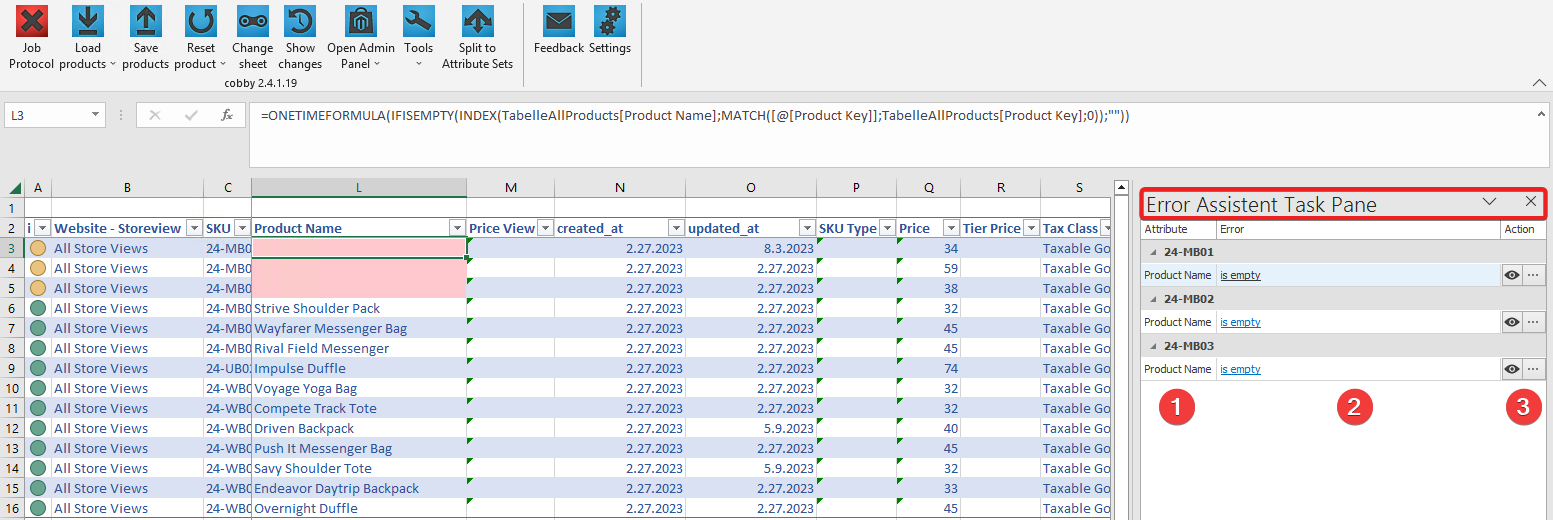
The error assistant organizes information into three key components:
1. Attribute Identification
Shows which attribute is affected by the error. This immediately narrows your focus to the relevant data field rather than requiring you to search through entire product records.
2. Error Message and Explanation
Provides the actual error code and message. Clicking on the error message opens detailed documentation explaining:
- What the error means
- Why it occurs
- Common causes
- How to prevent it in the future
This transforms cryptic error codes into understandable guidance.
3. Direct Action Link (Eye Symbol)
The eye icon is the most powerful feature—it instantly navigates you to the exact cell containing the incorrect value. This eliminates manual searching and ensures you're fixing the right data.
Why Structured Error Reporting is Essential
Speed and Efficiency
Traditional error handling often looks like this:
- Save operation fails
- Read error log
- Identify which product has the issue
- Search for the product in the spreadsheet
- Guess which field is wrong
- Fix it and retry
cobby's error assistant reduces this to:
- Error assistant opens automatically
- Click eye icon
- Fix the highlighted issue
- Retry
The time savings compound when dealing with multiple errors across many products.
Learning and Prevention
Each error message links to detailed documentation. This means every error is an opportunity to:
- Understand validation rules
- Learn about Magento requirements
- Improve data quality processes
- Prevent similar errors in the future
Over time, users make fewer errors because they understand the underlying rules.
Confidence in Data Quality
Knowing that cobby validates data before sending it to Magento provides confidence that:
- Invalid data won't corrupt your product catalog
- Errors are caught in a safe environment
- You can experiment and iterate without risk
- Data quality standards are enforced consistently
How Error Detection Works
Understanding the error detection process helps you appreciate what the error assistant does:
Validation Phase
When you save products, cobby performs validation checks before attempting to sync with Magento. These checks include:
- Required field validation: Ensuring mandatory attributes have values
- Data type validation: Confirming numbers are numeric, dates are valid, etc.
- Length validation: Checking text fields don't exceed limits
- Constraint validation: Verifying dropdown values exist, SKUs are unique, etc.
- Relationship validation: Ensuring configurable products reference valid simple products
Error Classification
Not all errors are the same. The error assistant distinguishes between:
Blocking Errors: Issues that prevent the save operation entirely (red job status, error assistant opens)
Warnings: Informational messages that don't block the operation (yellow job status with exclamation mark)
Server Errors: Issues that occur in Magento itself (red job status, but error assistant doesn't open)
Understanding this classification helps you prioritize responses.
The Difference Between Error Assistant Errors and Server Errors
This is a critical distinction:
Error Assistant Errors (Data Validation)
These occur during cobby's validation phase:
- Detected before data reaches Magento
- Error assistant opens with detailed information
- Fixable directly in the spreadsheet
- Examples: missing required fields, invalid dropdown values, duplicate SKUs
Server Errors (Magento Issues)
These occur after data passes validation but fails in Magento:
- Detected during Magento processing
- Error assistant doesn't open
- Require checking Magento error logs and PHP error logs
- Examples: permission issues, database errors, PHP timeouts
When you see a red job status but no error assistant, you're dealing with a server error that requires different troubleshooting approaches.
Why the Error Code Library Exists
cobby maintains a comprehensive library of error codes with detailed explanations. This library serves multiple purposes:
Standardization
Consistent error codes across all users and installations mean:
- Documentation applies universally
- Team members can share knowledge about specific errors
- Support can reference standard solutions
- Error patterns can be identified and addressed systematically
Education
Each error code page explains:
- The technical reason for the error
- Business context (why this rule exists)
- Step-by-step resolution
- Prevention strategies
This transforms errors from frustrating obstacles into learning opportunities.
Reference
The error library serves as living documentation of:
- Magento's validation rules
- cobby's additional validations
- Common pitfalls in product data management
- Best practices for data quality
Error Categories and What They Reveal
The error library organizes errors into categories that reflect different aspects of product data:
Attribute Errors
These reveal issues with basic product properties and data quality fundamentals
Configurable Product Errors
These indicate problems with product relationships and variant configurations
Tier Price and Quantity Errors
These show issues with pricing structures and customer group configurations
Media Errors
These surface problems with image handling and file management
Other System Errors
These indicate integration issues or system-level problems
Understanding these categories helps you identify patterns—if you frequently see configurable product errors, it suggests a need for better understanding of variant management.
The Role of Error Assistant in Workflow Quality
The error assistant isn't just about fixing problems—it's about improving processes:
Data Quality Gates
By catching errors early, the error assistant acts as a quality gate that:
- Prevents invalid data from reaching production
- Enforces data standards automatically
- Reduces manual quality checks
- Builds quality into the workflow itself
Process Improvement Feedback
Recurring errors indicate opportunities for:
- Better training on specific features
- Improved data entry processes
- Enhanced validation in source systems
- More robust import procedures
The error assistant makes these patterns visible.
Why Real-Time Validation is Superior to Batch Processing
Traditional import systems often validate entire batches and report all errors at once. cobby's real-time approach offers advantages:
Immediate Feedback Loop
You see errors as soon as you save, creating a tight feedback loop:
- Change → Save → Validate → Fix → Retry
This rapid iteration helps you learn faster and maintain momentum.
Contextual Awareness
Because you're still actively working on the products, you have full context about:
- What you were trying to accomplish
- Why you made specific choices
- What the correct values should be
This context fades if errors are discovered hours or days later.
Reduced Error Accumulation
Catching and fixing errors immediately prevents them from multiplying through related products or subsequent operations.
Related Topics
For information on job status, see: